
Teardown Multiplayer Not Working (Fix Guide)
Many players encounter the problem where Teardown multiplayer does not work: the game does not see friends, fails to connect to sessions, or crashes. In this guide, we will go through all possible causes and show how to fix these issues. How to enable the experimental Teardown beta was explained in a separate article.
Teardown Multiplayer Not Working: How to Fix
First, we need to understand all possible causes:
- Problems with the Steam beta
- Firewall and antivirus blocking the connection
- Incorrect NAT / network issues
- Incompatible mods
- Insufficient system performance
Let's examine each problem separately and find a solution!
Checking for the Teardown Beta Version
To play with friends in Teardown, everyone must have the experimental Teardown beta installed. How to do this is explained in a separate article. Make sure all players have the beta enabled. To do this:
- Go to your Steam library
- Search for Teardown
If the word [experimental] appears next to the game title, everything is correct.
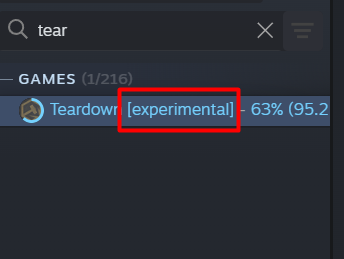
If the label is missing, right-click the game, select "Properties" – "Game Versions and Betas" – "Experimental", then wait for the game to update and launch. If all players have the beta installed, the multiplayer button will appear.
How to Disable Firewall and Antivirus Blocking
Another very common reason is blocking by the firewall/antivirus. This can be fixed in just a few clicks. Adding to the exceptions list:
- Type "Firewall" in the Windows search
- Open the page
- Add the applications "Steam" and "Teardown" to the exceptions list
- Or completely disable the firewall via "Turn Windows Defender Firewall on or off"
The same applies to antivirus software (depending on the application) — either add it to exceptions or completely disable the antivirus while playing.
Checking Network Settings
There are several steps that can fix the problem (though rarely).
- Restart your router
- Check NAT type (should be Open/Moderate)
- Open Steam ports for the game
Usually, all settings are correct by default, so this method does not work for everyone.
Incompatible Teardown Mods
One of the most common reasons why Teardown multiplayer does not work. There are two major issues here:
- Most older mods are not adapted for the experimental beta and simply do not work. You need to disable such mods.
- Players have different mods installed. Make sure both you and your friend have the same mods, otherwise multiplayer may not work.
Important! Mod authors are actively updating their creations for the current patch. Once multiplayer leaves beta and becomes official, almost all recent mods will already be updated for multiplayer support. So if you want to play with mods, it is best to wait until the official release of Teardown multiplayer.
Insufficient PC System Performance
And finally, another important reason is a weak computer or slow internet. All players’ PCs must meet the latest Teardown minimum system requirements, otherwise multiplayer problems may occur. Additionally, the host (the player who opened the server) must have a fast and stable internet connection.
How to create your own Teardown server and play with friends
- 981
- 0
- 15 feb 2026
How to Install Mods for Teardown in 2026
- 945
- 0
- 15 feb 2026
How to Enable Multiplayer in Teardown – Step-by-Step Guide
- 922
- 0
- 13 feb 2026
Comments 0
Rules for writing comments. For non-compliance - ban!
- Use of profanity (mat) in messages
- Communication is not on the topic of the material
- Any insults of other participants, including the author of the material
- Writing messages in whole or in part in CAPITAL letters (Caps Lock)
- Expressing your opinion without supporting it with arguments
- The use of links to third-party sites, or the use of images/videos/other content containing the aforementioned links
Messages that violate these rules will be deleted, and malicious violators - deprived of the ability to add comments on the site!