
Mods


- 1043
- 203
- 0
This mod adds a child's short dress: 22 variants; New mesh; All levels of detailing and maps; Compatibility with the base game; User sketch.

- 1719
- 513
- 0
New male hairstyle for The Sims 4: - 30 colors; - All levels of detail; - Works with hats.

- 1107
- 206
- 0
New Oversize Dress-Sweater for your ladies: - 18 color variations; - New grid; - All lodes and cards; - For teenagers and older; - Compatible with the base game.

- 2429
- 792
- 0
New female jeans for The Sims 4: 10 patterns; New mesh; Shadow and normal maps; All levels of detail; Compatibility with the base game.

- 1291
- 317
- 0
This mod adds new female hairstyles: 30+ colors; All lod's (needed for performance of the game process); Compatibility with HQ and hats.

- 12578
- 2821
- 0
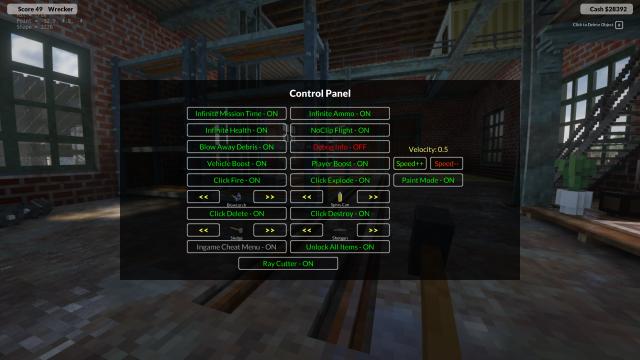
Incredible cheat mod for Teardown adds to the game a menu with cheats and many other features. The functionality of the mod is simply huge, all standard cheats are available + a lot of other things. To work with the cheat, you need to have a new mod loader (Modloader). So, let's look at the features of this cheat: - Infinite mission time. Everything is clear here, just destroy as much as you want without time limits; - Infinite ammo. No need to save anymore; - Invincibility, infinite amount of character health; - Flight mode (noclip) and passing through objects; - Acceleration of vehicles and flight on cars; - Acceleration of the character and flight mode without the Noclip effect; - Instant unlocking of all tools and weapons; - Click for fire. There is such a separate mod, but now this mod is included in this cheat. Just turn it on, click anywhere and a strong fire starts there; - Click for explosion. The same as the "click for fire" mode, but now you can arrange explosions by pressing the mouse button; - Click for deletion. With this function you can destroy absolutely everything, even those items that were previously impossible to destroy. Be careful with this function; - Click for destruction. Just breaks things when clicked. Be careful, if used incorrectly, can lead to a crash of the game; - Saw. This can be called something like a laser saw. You will cut objects in the direction you are looking; - Menu where you can change the values of the mod functions, strengthen or weaken certain functions; - Other possibilities. Installation: - Drop the SirCodesCheatsMod folder from the archive to the path Teardown \ Mods. The path of the mod should look like this: Teardown \ Mods \ SirCodesCheatsMod \ (mod files); - Be sure to check that there is only 1 folder with this mod (sometimes a clone appears). This is an important point, because if there are 2 folders - the game will crash.

- 6974
- 1385
- 0
A mod for Teardown adds a new map - a large hospital. The map is intended for the experimental version of the game (go to the game properties in Steam and select the beta test). The map is still in development and will be constantly updated.

- 2709
- 311
- 0
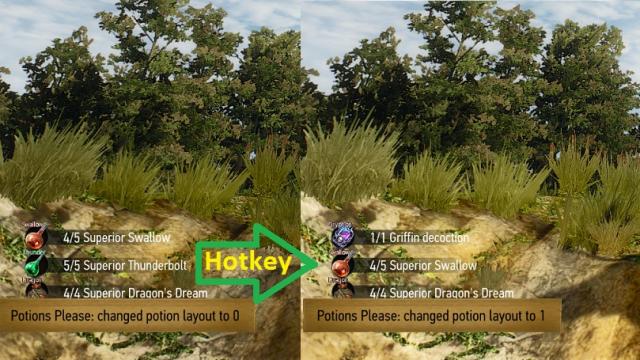
A very useful mod for The Witcher 3 adds new slots for potions and food. In fact, the slots remain the same, only switching slots appear. That is, press the hotkey, switch to slot 1, where there are 3 types of potions or food, press again - switch to slot 2, where there are still 3 potions and food, and so on. Very simple, convenient. The hotkey for switching between slots is selected in the mod settings. The hotkey must be used either in combat or in the item selection menu. Installation: - Move the contents of the archive to the mods folder in the game root folder; - Make sure that the following folder structure is present: mods\modPotionsPlease\content.